Coin Counter
Problem, solution, stack, timeline, and outcomes — from a real product in our portfolio.
The problem
Counting large volumes of coins by hand is slow and error-prone — a daily grind for cashiers, small businesses, and collectors. Hardware coin counters solve it, but they are expensive, stationary, and overkill for most users. The idea: turn the phone people already carry into the counting machine. Worn coins, overlapping piles, and harsh indoor lighting defeat demos trained only on neat studio photos. Cashiers also need offline continuity when till-area connectivity drops mid-count. Real tills add motion blur from hurried hands, mixed lighting across store brands, and staff who will abandon any flow that needs a training seminar before the first count.
The solution
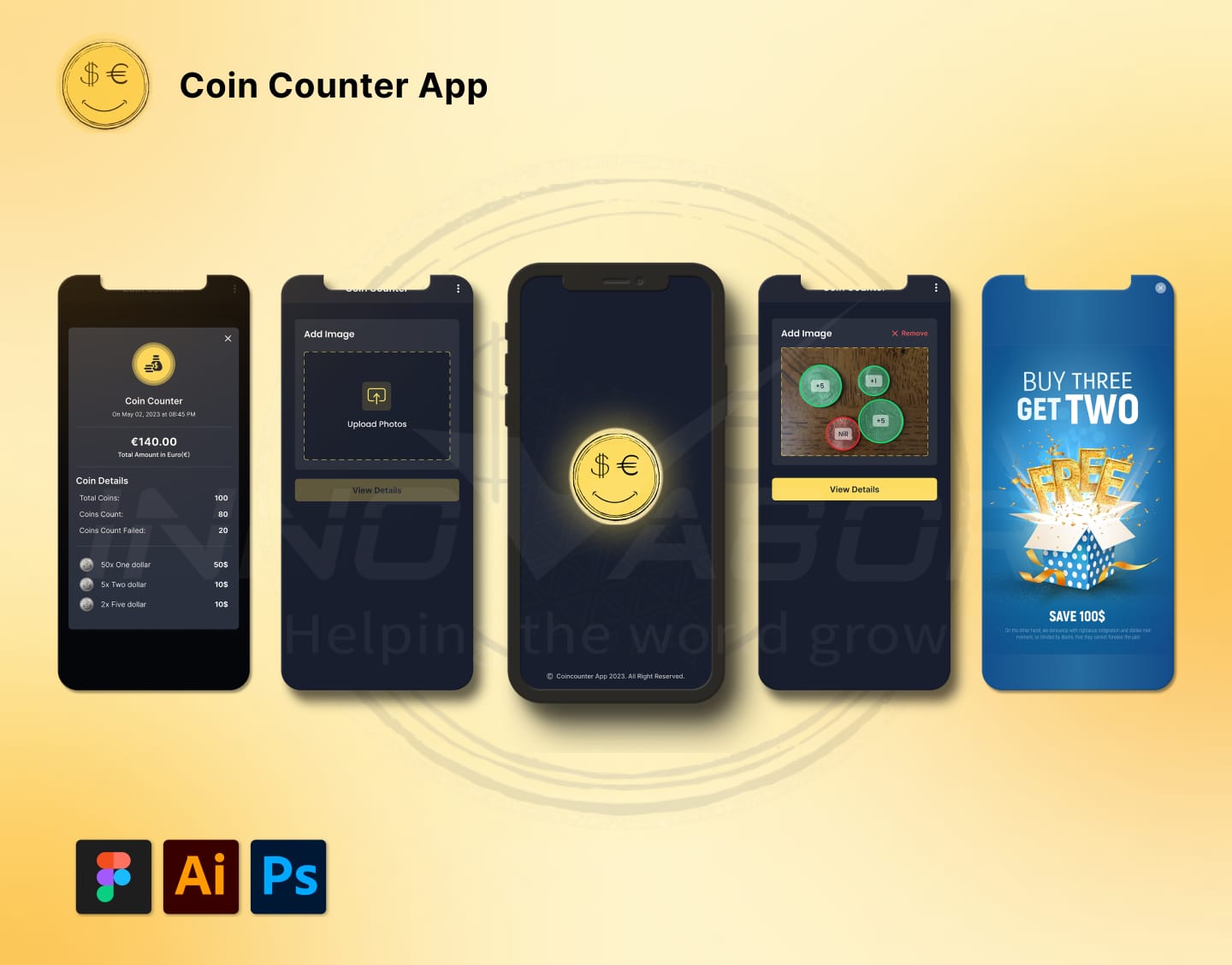
We built a mobile app that uses the device camera and on-device image recognition to identify, classify, and count coins in real time. Point the camera at a pile of coins and the app detects each denomination, keeps a running total, and lets the user save or share counts. The recognition pipeline was tuned for overlapping coins, varied lighting, and worn faces — the messy conditions real users actually shoot in. We focused on resilient capture guidance, offline-capable counting flows, and save or share paths for shift handoffs—without publishing invented accuracy marketing numbers. We invested in capture guidance, offline persistence, and honest uncertainty states, then validated on messy partner samples instead of only studio decks.
Snapshot
| Domain | Computer vision utility |
|---|---|
| Platforms | iOS + Android |
| Core tech | On-device camera recognition |
Key flows
Capture & detect
User points the camera at a pile; the pipeline detects coin candidates under overlap and uneven light before classification.
Classify & total
Denominations are classified on-device; a running total updates without requiring a network round-trip for the count itself.
Save & share
Counts can be saved or shared so cashiers and collectors keep a history without dedicated hardware counters.
Milestones
- Discovery: define lighting/overlap challenges and offline requirement
- Prototype: camera pipeline and denomination classes
- Hardening: messy real-world capture conditions
- Store-ready builds and handover docs
Coin piles in the wild overlap, reflect light unevenly, and include worn faces—studio demos that ignore that reality fail cashiers on day one.
Offline counting was a product requirement: connectivity in a till area is not guaranteed, and counts must not vanish mid-shift.
Discovery artifacts that helped: sample photo sets, denomination lists, and a definition of “accurate enough” agreed before model tuning.
Release habits: permission prompts, empty states when the camera sees no coins, and save/share for shift handoffs.
We do not publish invented accuracy percentages here. Ask for a scoped evaluation plan if metrics matter to your buy.
Cashiers need confidence under time pressure; the UI prioritizes large capture affordances over dense settings.
Denomination configuration is treated as product data, not a one-off hardcode, so regional lists can evolve.
Error states explain whether the camera saw no coins, a blur, or an unsupported mix—without fake precision.
Buyer tip: bring sample photos from real tills, not only marketing shoots, to the scoping call.
Related paths: Flutter or custom mobile pages for broader builds.
We refuse accuracy theater in this write-up. Ask for a scoped evaluation plan if metrics gate purchase.
Offline save paths protect counts when connectivity drops mid-shift—continuity was a requirement, not a nice-to-have.
Capture UX: large shutter targets and framing guides beat tiny icons when hands are busy at a till.
Lighting realism: overhead fluorescents and metallic reflections were part of test sets, not only daylight studio shots.
Overlap handling: stacked coins create partial contours; the product path explains uncertainty instead of silent wrong totals.
Offline queue: counts persist when connectivity drops so a mid-shift outage does not erase work.
Handoff: save/share supports shift changes without forcing a cloud round-trip as the only path.
Configuration: denomination lists are data, enabling regional evolution without rewriting the client.
QA ritual: weekly device runs on mid-tier Android and recent iPhones with messy piles from partner sites.
Store readiness: permission copy and camera purpose strings written early to avoid submission thrash.
Non-claims: no published accuracy percentage, download rank, or revenue lift appears in this study.
Buyer prep: bring twenty real till photos and a definition of accurate enough before model tuning debates.
Failure copy: blur, empty frame, and unsupported mix each get distinct guidance—not one generic try again.
Performance budget: inference must feel interactive during a count; we treated latency as UX, not a lab metric alone.
Security note: local images from counts are handled per agreed retention—not left as unbounded camera roll spam.
Related reading: Flutter/custom mobile for broader builds.
Milestone pattern: discovery samples, prototype guidance, offline persistence, hardening on messy sets, store and handover.
Stakeholder lesson: finance wanted a single accuracy number early; we redirected to a scoped evaluation plan instead of inventing one.
Ops lesson: training materials for cashiers mattered as much as model tweaks when lighting varied by location.
Field note: different store chains needed different framing tips; we parameterized tips rather than shipping one brittle overlay.
Field note: managers wanted export for reconciliation; export stayed opt-in to keep the primary count loop fast.
Field note: accessibility large type helped older cashiers without cluttering the capture screen.
Field note: we documented a rollback for model packs so a bad pack could not strand a busy Saturday.
Field note: privacy review asked how long sample images live; retention joined the SOW checklist.
Till staff preferred audio confirmation optional; we kept it off by default to avoid noisy floors.
Model pack size was budgeted against install constraints on older Android devices.
We avoided gamified streaks that would distract from counting accuracy work.
Partner feedback preferred fewer settings toggles during the first week of use.
Capture timeout messaging explained next steps when hands shook the frame.
Regional rollout planned configuration files per market instead of forked apps.
Support macros referenced screenshot examples of good versus bad piles.
Battery impact of continuous camera preview was reviewed on mid-tier devices.
We separated admin configuration screens from cashier capture to reduce accidental edits.
Acceptance demos used partner-provided piles under store lights, not only stock photos.
Stack
- iOS and Android mobile clients
- On-device camera capture and image recognition
- Denomination classification and running totals
- Offline-capable processing (no network required for counts)
Timeline
Scoped in a discovery call, delivered in fixed milestones with sprint demos, then a documented handover for store-ready builds.
Outcomes
- Users can count coin piles with the phone they already carry — no dedicated hardware counter.
- Recognition works under overlapping coins, varied lighting, and worn faces.
- Counts stay available offline because processing runs on-device.
- Capture guidance helps messy piles instead of assuming studio lighting.
- Offline continuity protects mid-count failures when connectivity drops.
- Shift handoff history is clearer without inventing accuracy marketing numbers.
- Cashiers get distinct guidance for blur, empty frames, and unsupported mixes.
- Counts can persist through connectivity drops during a shift.
- Denomination configuration can evolve without a full client rewrite.
- Messy-light test sets informed UX contrast and framing guidance.
- Stakeholders received a path to evaluate accuracy without a fabricated marketing percentage.
Capabilities
- Real-time coin detection and classification through the camera
- Per-denomination totals with saved count history
- On-device processing — works without a connection
- Built for iOS and Android


Building something similar?
Free scoping call with our team — book Calendly, call, email, or send a short brief.